BlogAI
Software Just Got More Accessible and It Changes a Lot
Picture a CFO who needs a client-profitability view before Thursday's board meeting. The data is spread across a SharePoint list, two CSV exports her team keeps in OneDrive, and a stale Power BI dashboard that nobody has touched in six months. She has four hours.
A year ago, that is a call to the analytics team, a ticket in a queue, and a slide deck with last-quarter's numbers. Today, she opens Microsoft 365 Copilot, points Copilot Cowork at the files in OneDrive and the SharePoint list, asks for client-level margin trends broken out by service line, and gets a clean view with source citations. Five minutes before the board walks in, she has a dashboard sharper and more specific than the Power BI report her team spent two weeks building last year. She built it herself, in five minutes, with the tools her organization already pays for.
This is happening inside Microsoft 365 tenants already. The cost of producing a small piece of working software or a single-purpose deliverable collapsed. The execution layer that used to absorb most of the build time, the data wrangling, the chart formatting, the first-draft application logic, often takes an hour now. The strategy and judgment behind the work still take expertise. The implications for how mid-market companies buy software, build internal tools, and invest in their teams are substantial, and most organizations are underestimating them.
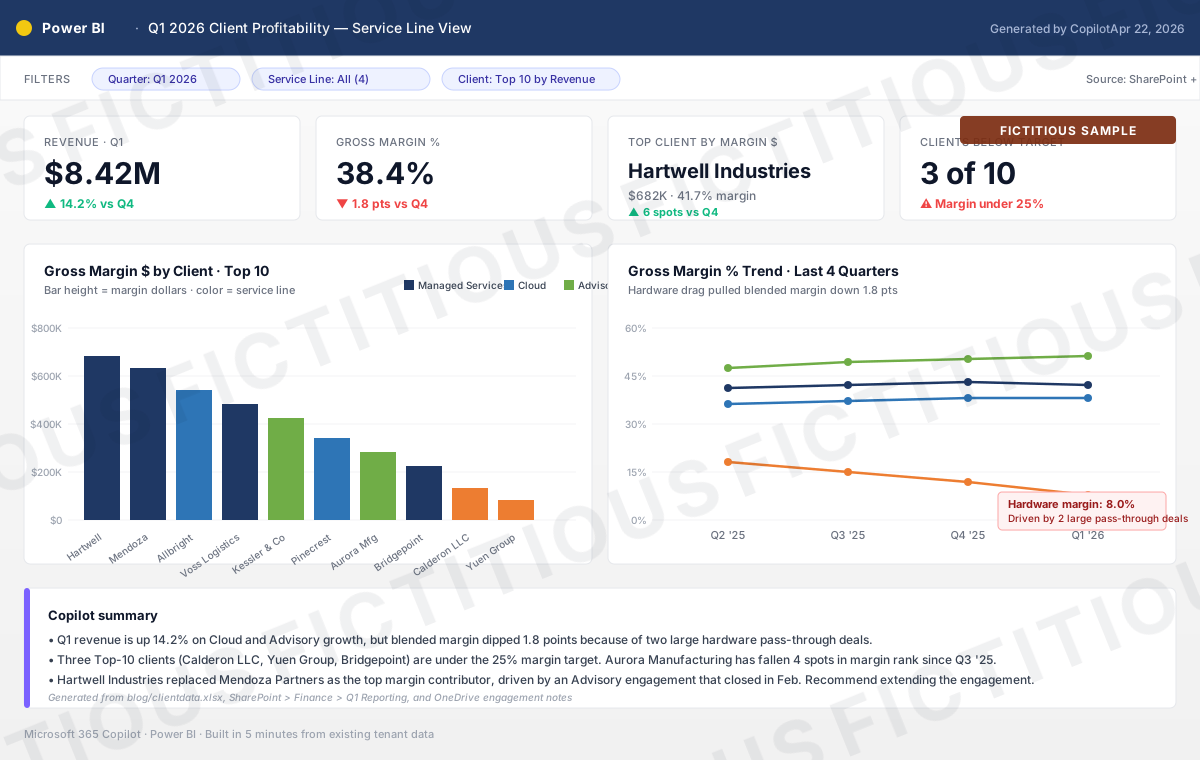
Figure 1: Fictitious sample. Not real data. The kind of view a finance leader can produce in five minutes by pointing Copilot Cowork at her existing SharePoint and OneDrive sources. (And, while we're being honest: this mock-up itself took about three minutes to generate inside the writing flow for this post. The same shift, one layer smaller.)
You don't need to build everything-for-everyone software anymore
Traditional enterprise software assumes every tool has to serve a wide audience to justify the build. Multi-user. Generic. Permission models. Configurability for every edge case. Long roadmaps, longer release cycles, and a feature backlog that grows faster than the team can ship.
That model still makes sense for products that serve millions. It makes less sense every quarter for software that serves you, or your team, or one specific niche of one specific client.
When the cost to build a fit-for-purpose tool is a few hours of guided AI conversation, the calculus flips. A sales operations leader can build a deal-review app in Power Apps with Copilot in an afternoon, tied to Dataverse, surfaced in Teams, and governed by the same sensitivity labels as everything else in the tenant. A finance team can stand up a project-margin tracker that pulls from their existing data sources and drops the output in a SharePoint site the rest of the org can see. Both tools do exactly what their users need. Both can be forked, adjusted next month when priorities change, or retired when the work moves on.
You don't need rigid tooling for the deliverable, either
The same shift is happening one layer up, in the artifacts people make with software.
Office Timeline used to be how I built a halfway-decent timeline for a PowerPoint with never-ending frustration dealing with dependencies, alignment issues, and other tool constrained challenges. It’s what we had though and it was good enough. Third-party diagram tools became how you made a board-ready visual. Entire product categories exist because building these artifacts manually was painful and the off-the-shelf option was the lesser evil. Looking at you Visio and LucidChart.
Microsoft 365 Copilot now produces timelines, diagrams, slide decks, and dashboards from a prompt. Copilot Cowork takes it further: it pulls the data, builds the artifact, and lands it in OneDrive, all while operating inside the tenant's security boundary. The output is good enough for most internal work and getting better every release. If I am being honest, it’s really better than good enough and it afforded me the time to write this blog post instead of squinting trying to get alignment on that chart in PowerPoint just right. The middle-layer tools are losing their reason to exist.
The board-meeting scenario above is real today, not a demo. Well… it is made up, so kinda a demo. The Gantt chart I built from three Teams group chats in three minutes and blogged about is real today. The custom internal app a department builds in Power Apps over lunch is real today. The organizations ahead of this curve are already reclaiming hours a week per knowledge worker, and the ones behind are still paying for tools their users no longer need.
What this means for what you buy
If you run IT, operations, or finance for a mid-market company, run this question through your portfolio right now:
-
Which tools are we paying for because the deliverable was hard to make manually? These are the first candidates for scrutiny. Microsoft 365 Copilot and Cowork produce most of those deliverables already.
-
Which tools are serving 10 people but priced for 1,000? A fit-for-purpose alternative in Power Apps or Power Pages is a one-week project when AI writes most of the formulas and layout.
-
Which workflows assume software has to be permanent? Some software needs to be permanent. A lot of it does not, and treating disposable workflows like permanent investments is how you accumulate SaaS sprawl and technical debt.
Some of these tools still earn their keep. The next time someone asks for a budget line for a niche tool, the better answer is often "let's spend a couple of hours seeing what we can build inside M365 instead."
Enablement and a secure place to work
Most organizations are still framing AI as a procurement decision: which license tier, which vendor, which pilot. Procurement matters, and it's a small fraction of what determines whether AI produces measurable value in your business. Three areas drive most of the productivity gains:
-
Teach people how to use the tools. Copilot Cowork uses a different prompt shape from Copilot Chat, and both require thinking about goals and inputs in a way most users have never been taught. A two-hour targeted workshop with a sales team, a finance team, or an operations team produces more productivity lift than a site-wide license rollout.
-
Curate the data users can point AI at. Copilot is only as useful as the data it can reach. Purview sensitivity labels that actually work, a SharePoint architecture cleaner than 15 years of accumulated folders, and a clear policy on what data belongs where, all directly determine output quality.
-
Keep it secure and compliant. Microsoft Defender and Purview, paired with Entra ID and Intune, give you a tenant where AI can do its job without leaking anything sensitive. Most mid-market organizations have the license entitlements to do this already.
The businesses pulling ahead with AI right now are the ones whose people know how to use it effectively, on data the organization has governed, inside an environment IT can defend. Enablement and governance are where the measurable outcomes come from, and where most of the consulting work pays back.
Where this goes
The end state is software that gets built when you need it, used while it is useful, and replaced when it is not. The same way you do not keep a printed spreadsheet from last quarter, you will not keep an app that solved last quarter's problem.
The companies that figure this out first are running lighter, moving faster, and spending less. The ones that have not are still buying SaaS for problems they could solve themselves in a week, and still wondering why Copilot adoption numbers are not translating into business results.
If you want to talk through what this looks like for your org, what to build inside M365, what to stop paying for outside of it, and how to enable your people to get measurable value from the AI tools they already have, reach out.
Working through the same problems?
Jason compares notes with IT leaders every week. Reach out on LinkedIn.