BlogAI
How Do You Secure a Custom AI Agent's Access with Agent 365?
Video · 4:47
The 5-minute version
Why does an agent need its own identity?
An agent needs its own identity because it acts in your environment, and anything that acts needs an identity the same way a person does: something you can name, give permissions to, watch, and switch off. Agents have moved past answering questions. They read files, call other systems, and take action on their own.
When you build your own agents, that has been the hard part. Most end up borrowing one shared identity for the whole platform, or holding secrets and user tokens in their own code (a really bad idea). So when an agent touches your data, the logs show the platform instead of the agent (or the user that operates it), and there's no clean way to stop one agent without stopping all of them or know specifically what caused what.
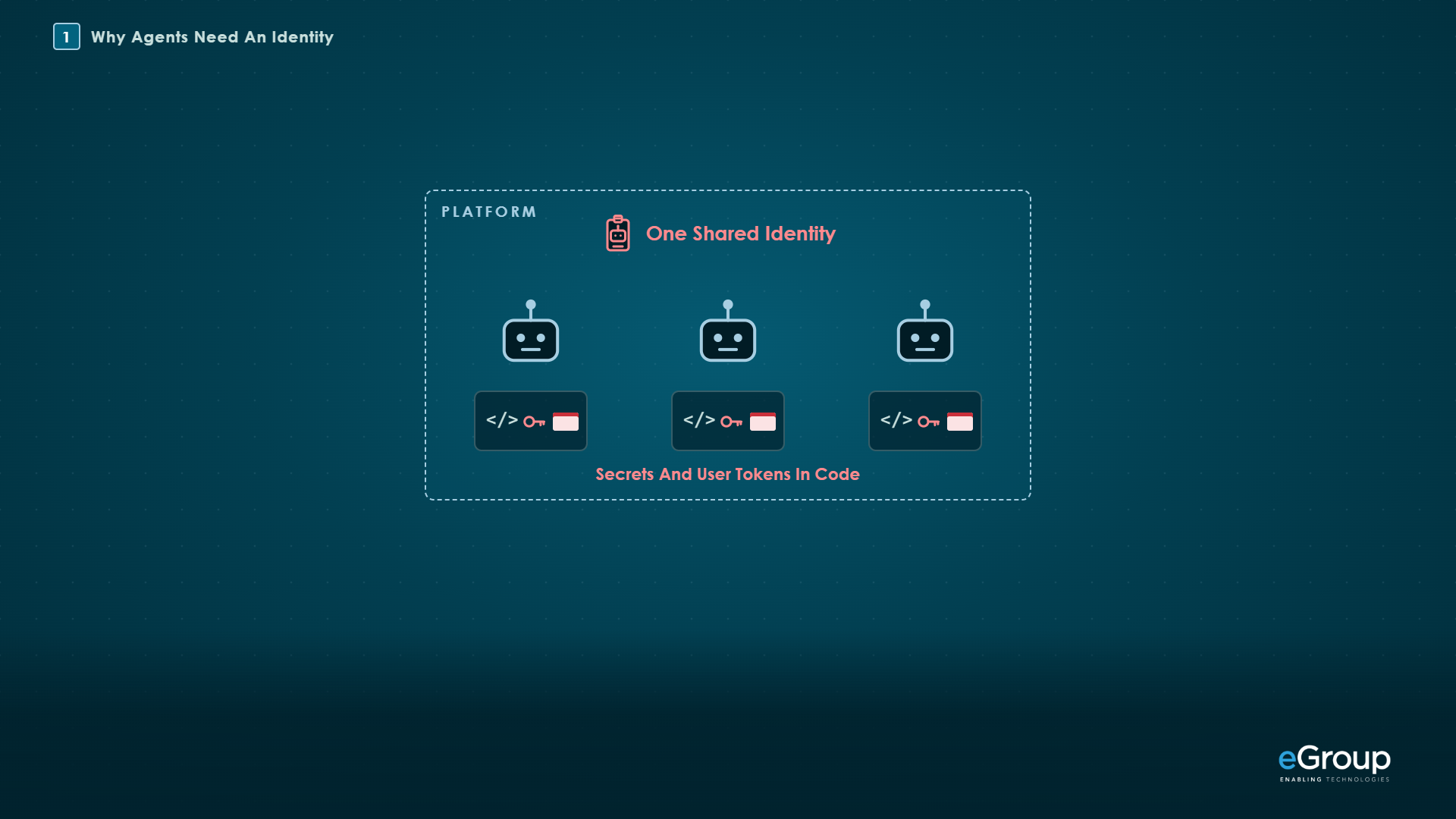
Microsoft Entra Agent ID gives each agent its own identity in Entra and keeps credentials out of the agent's code, and as of October 2026 it's generally available. This post covers agents you build and host yourself, which Microsoft's setup guide calls agents from third-party platforms. Copilot Studio and Microsoft Foundry create agent identities through their own platforms, so they aren't the subject here.
The example I'll use the whole way through is one agent you've built, running in a container with Microsoft's sidecar beside it. Azure Container Apps is one of the places Microsoft documents for that setup.
What are the three pieces?
The three pieces are the agent identity blueprint, the agent identity, and the Microsoft Entra Auth SDK running as a sidecar.
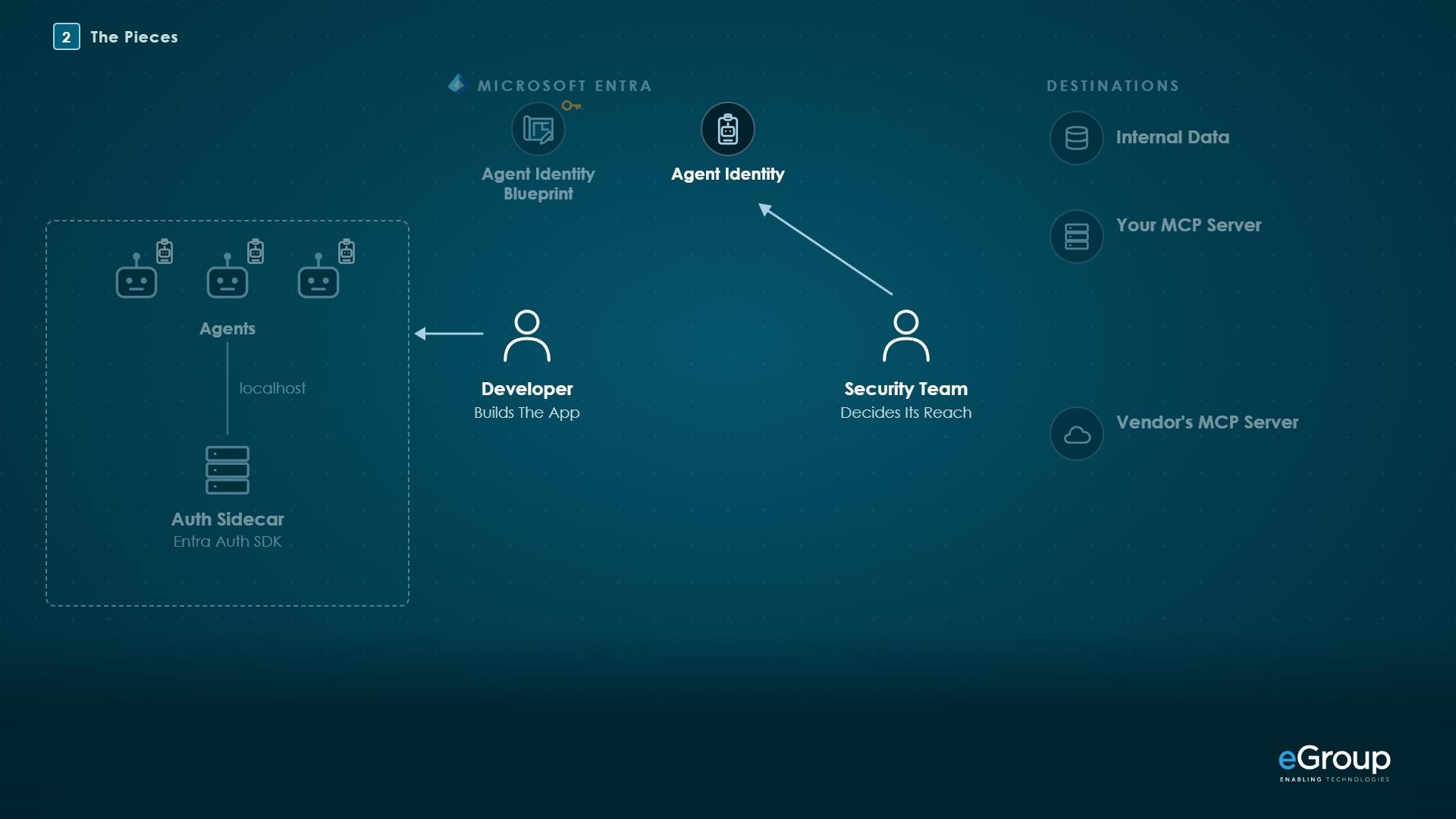
The agent identity blueprint is the template for one kind of agent, and it's the only piece that holds a credential. Microsoft calls a managed identity the preferred credential type and says client secrets shouldn't be used as the blueprint's credential in production. I covered what else a blueprint holds, including the permissions every agent inherits from it, in Agent 365: How Agent Blueprints Work.
The agent identity is what each agent made from the blueprint signs in as. It has its own app ID, its own permission grants, and its own audit trail, and no credential of its own. It can only be issued tokens in the tenant where it was created.
The Microsoft Entra Auth SDK runs as a sidecar container next to the agent. The agent asks it for tokens over localhost, and the sidecar handles the blueprint's credential, gets the tokens, caches them, refreshes them, and runs the on-behalf-of exchange when the agent works for a user. It has no host port, so only containers that share its network can reach it. In Azure Container Apps that's every container in the app, so keep only containers you trust in there.
I think of it the way we've handled applications for years. The developer builds the app, and the security team decides what it can reach.
Microsoft's Agent ID FAQ sets a few limits, as of October 2026. A non-Microsoft platform creating agent identities with app-only permissions can make up to 250 per blueprint. A set of high-risk Microsoft Graph permissions can't be granted to agents, including Application.ReadWrite.All, RoleManagement.ReadWrite.All, User.ReadWrite.All, and Directory.AccessAsUser.All. Highly privileged directory roles such as Global Administrator are blocked for agent identities too.
How does an agent get a token on its own?
An agent gets a token on its own through two exchanges the sidecar runs for it: the blueprint signs in and gets an exchange token, and the agent identity trades that token for one issued in its own name.
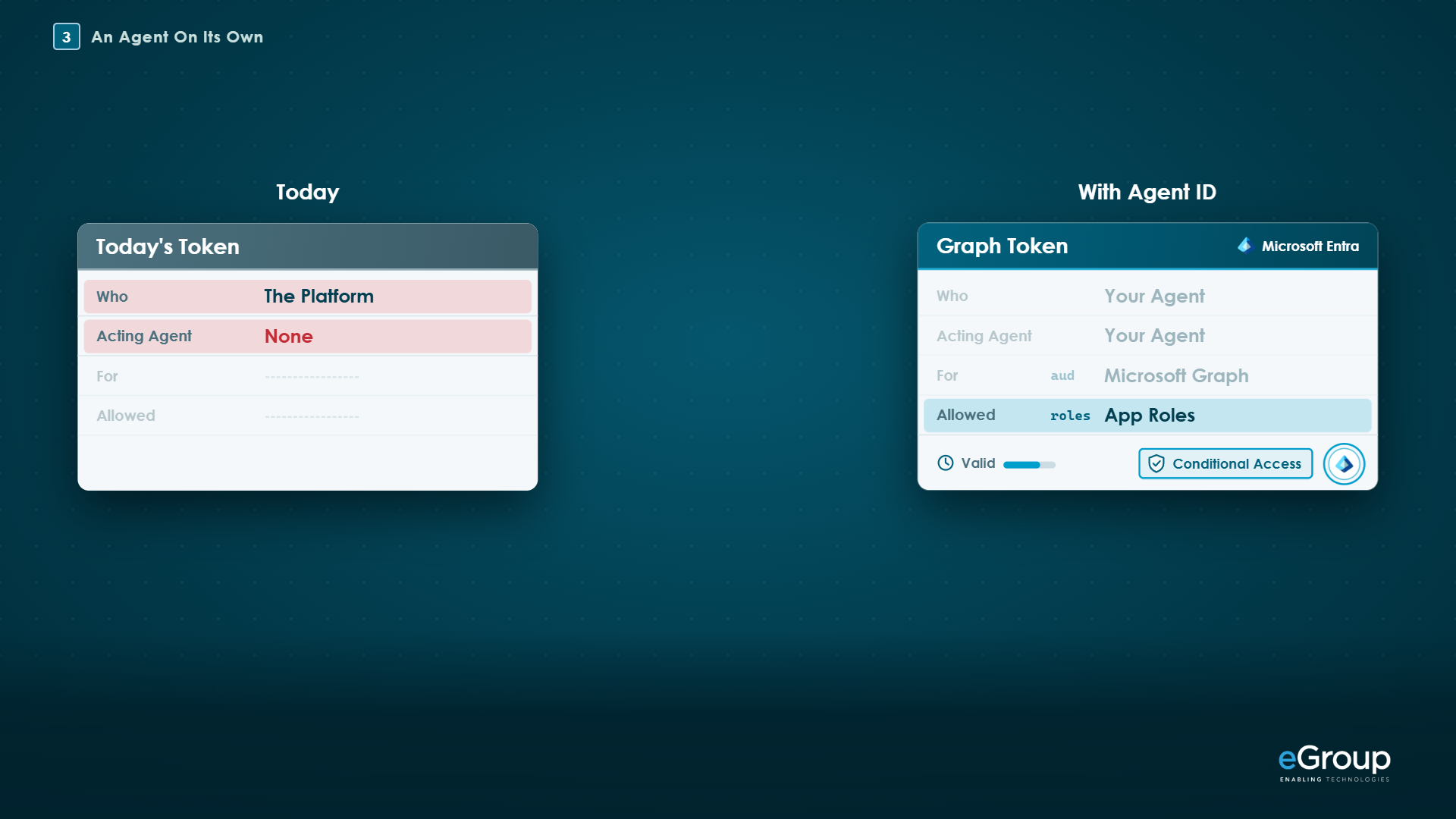
Take the example agent running on a schedule, with nobody signed in, reading files in SharePoint. It asks the sidecar for a Microsoft Graph token as its agent identity. The sidecar signs in as the blueprint with the managed identity and gets an exchange token, which Microsoft calls T1. Then it trades T1 for a Graph token issued to that one agent identity (Microsoft Learn). Under the hood, both requests go to your tenant's token endpoint:
POST https://login.microsoftonline.com/<tenant>/oauth2/v2.0/token

1. The blueprint gets T1
client_id             = <blueprint app ID>
scope                 = api://AzureADTokenExchange/.default
fmi_path              = <agent identity client ID>
client_assertion      = <managed identity token>
client_assertion_type = urn:ietf:params:oauth:client-assertion-type:jwt-bearer
grant_type            = client_credentials

2. The agent identity trades T1 for a Graph token
client_id             = <agent identity app ID>
scope                 = https://graph.microsoft.com/.default
client_assertion      = <T1>
client_assertion_type = urn:ietf:params:oauth:client-assertion-type:jwt-bearer
grant_type            = client_credentials
Conditional Access evaluates the second request, the one that issues the agent's token, and a policy there can target the agent identity or its blueprint. It doesn't evaluate the T1 exchange, which goes to what Microsoft calls the "AAD Token Exchange Endpoint: Public," and it doesn't apply at all if the tenant uses security defaults (Conditional Access for agents). Graph then sees one named agent, limited to the app roles granted to that agent identity, including any it inherits from the blueprint.
How does an agent act for a user?
An agent acts for a user by trading the user's token for one that names the user as the subject and marks the agent as the one acting.
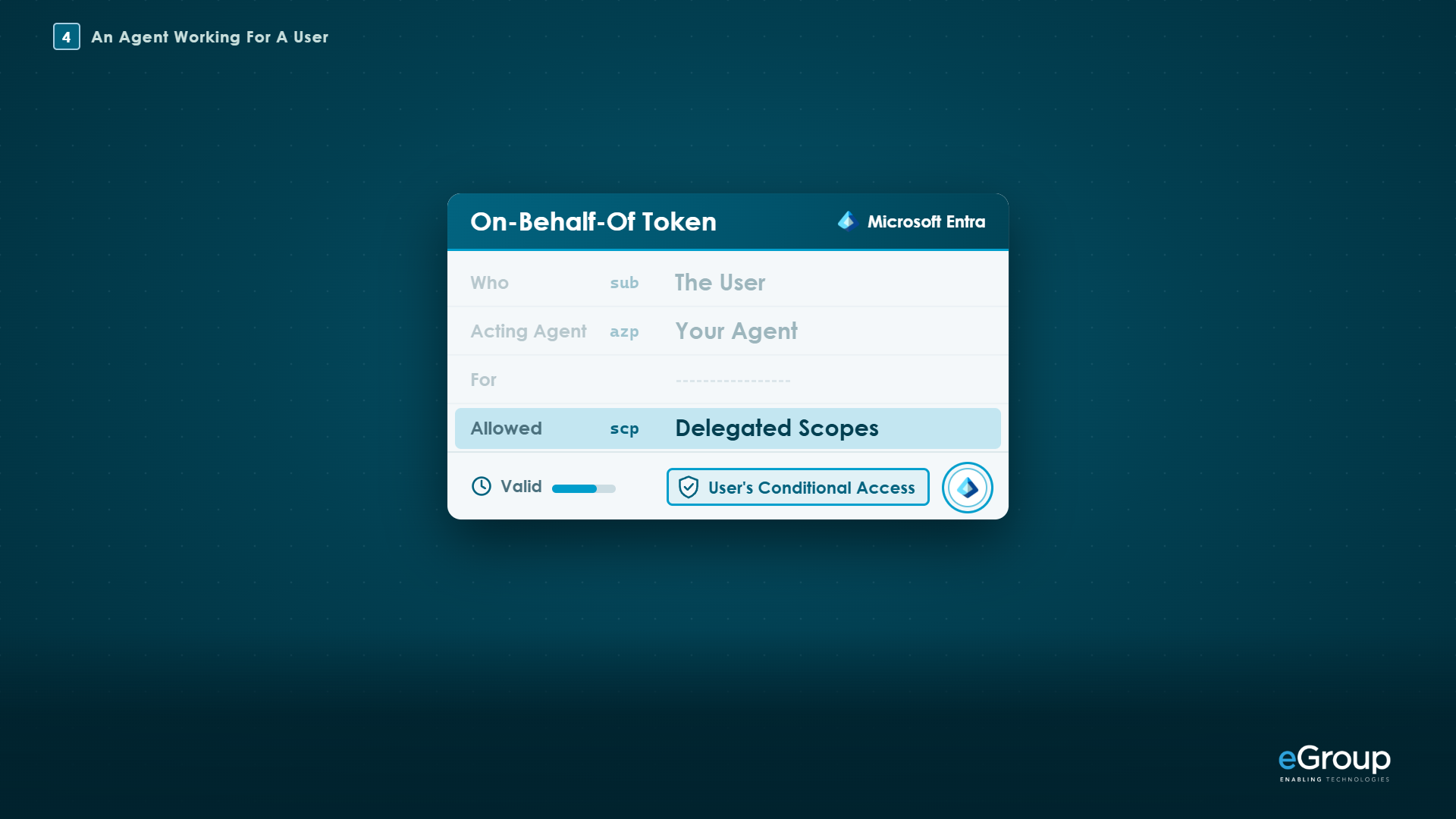
Say a person starts the work from an app they sign in to. That app gets a token for the blueprint, which Microsoft calls Tc, with the scope api://<blueprint app ID>/access_agent. A token issued for another resource, like Graph, is rejected with AADSTS50013. The app hands Tc to the agent, the agent passes it to the sidecar, and the sidecar trades Tc and T1 in an on-behalf-of exchange:
client_id             = <agent identity app ID>
client_assertion      = <T1>
client_assertion_type = urn:ietf:params:oauth:client-assertion-type:jwt-bearer
grant_type            = urn:ietf:params:oauth:grant-type:jwt-bearer
assertion             = <Tc>
requested_token_use   = on_behalf_of
scope                 = <the target resource's scope>
The token that comes back is the user's. Microsoft's token claims reference shows oid as the user, azp (or appid) as the agent identity's app ID, xms_act_fct set to 11 (AgentIdentity), and scp holding the delegated scopes. The user's Conditional Access policies apply, because the user is the subject, and a policy that targets agent identities doesn't cover these requests. The agent can reach only what that user can reach, within the scopes it was granted.
The sidecar caches those tokens in its own memory, so your agent's code isn't where user tokens are kept. That cache has limits for long-running work, which are in the checklist at the end.
The two flows side by side:
| What differs | On its own | For a user |
|---|---|---|
| The token is issued to | The agent identity | The user, with the agent marked as acting |
| Conditional Access evaluates | Policies on the agent identity or its blueprint | The user's policies |
| The agent can reach | Its app roles, including inherited ones | What the user can reach, within the granted scopes |
| Final grant type | client_credentials |
jwt-bearer with requested_token_use=on_behalf_of |
How do you protect your own MCP server?
You protect your own MCP server by registering it in Microsoft Entra ID as an API that issues v2 tokens, so it only answers callers that bring a token issued for it (Microsoft Learn). MCP, the Model Context Protocol, is the open standard agents use to call tools and data, and agents increasingly do their work through MCP servers.
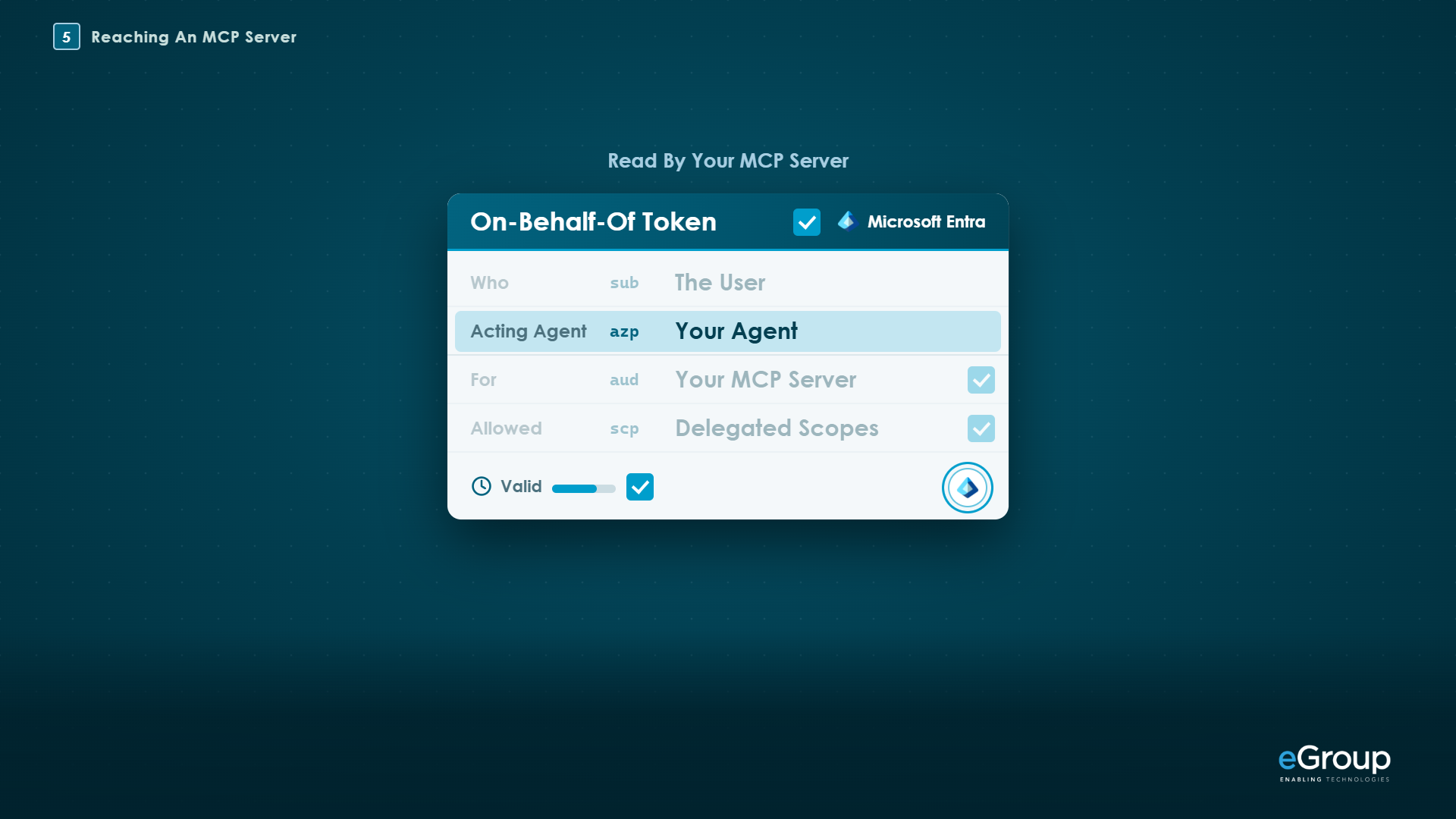
Microsoft says to do the setup in a specific order: switch the app registration to v2 access tokens first, then add the HTTPS Application ID URI, and register every URL a client might use. A call without a token gets a 401 whose header points to the server's protected resource metadata, the document defined by RFC 9728, which lists your tenant's v2.0 issuer as the place to get a token:
HTTP/1.1 401 Unauthorized
WWW-Authenticate: Bearer resource_metadata="https://<your server>/.well-known/oauth-protected-resource"
With a token, the server checks it was issued for that server, by your tenant, and is still valid. Microsoft notes the audience is the server's application ID, not its URL. Then the server checks the app roles (for an agent on its own) or the delegated scopes (for an agent acting for a user), and whether that caller is allowed the operation. Microsoft says to use a library such as Microsoft.Identity.Web instead of writing the validation yourself.
The server can also log exactly which agent called. Agent identity tokens carry xms_par_app_azp, the blueprint's app ID, and Microsoft's claims reference says not to use it for authorization decisions; log it for auditing instead.
If a token request fails with AADSTS9010010, Microsoft lists three causes: the resource doesn't exactly match a registered Application ID URI (and an Application ID URI can't end in a slash), the app isn't on v2 tokens, or the scope belongs to a different app registration. Conditional Access can protect the server as well, once it has an enterprise application (service principal) in your tenant (Microsoft Learn).
How do you reach a vendor's MCP server?
You reach a vendor's MCP server through Azure API Management, because the vendor's server usually trusts its own OAuth instead of Entra. An Entra token won't open it, and Conditional Access can't see that hop, since by Microsoft's own description it only protects resources secured by Microsoft Entra ID.
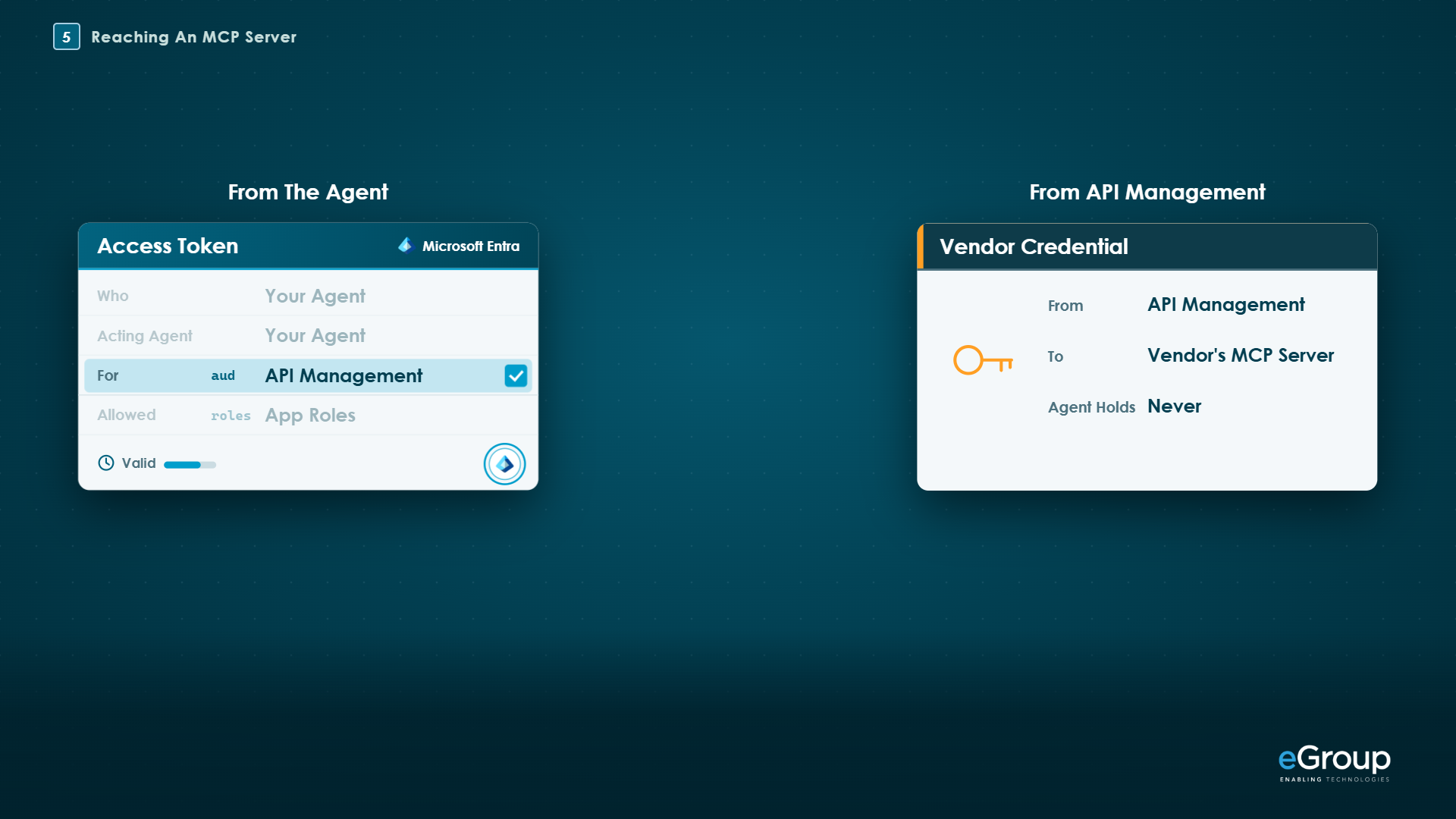
With Azure API Management (APIM) in front of the vendor's server (Microsoft Learn), the agent gets an Entra token for APIM instead. On the way in, the validate-azure-ad-token policy checks that token and can restrict which client application IDs it accepts. On the way out, APIM's credential manager holds the vendor connection and adds the vendor's token through get-authorization-context, and a set-header policy with exists-action="override" on Authorization keeps the agent's Entra token from going on to the vendor. The vendor credential stays encrypted in APIM's credential store, and the agent never holds it.
Microsoft's documented MCP example uses a shared vendor connection, so every request reaches the vendor as the same account; per-user vendor access isn't documented for agents as of October 2026. The APIM tiers that can expose an existing MCP server are Developer, Basic, Basic v2, Standard, Standard v2, Premium, Premium v2, and the self-hosted gateway, but not Consumption or workspaces.
What I would avoid is giving agents API keys. Microsoft's own Conditional Access for agents page says an agent using an API key bypasses the Entra authentication and token issuance pipeline entirely, so Conditional Access doesn't apply to it.
For governance, APIM can be connected to the Tools Gateway in the Microsoft 365 admin center, under Agents > Settings > Gateways, where admins see the MCP servers behind it and allow or block each one. A Global Administrator consents once for the tenant, and the Tools Gateway is in preview as of October 2026.
How do you control and monitor agents?
You control and monitor agents much the way you do users, because each one has its own identity you can target, disable, and find in the logs.
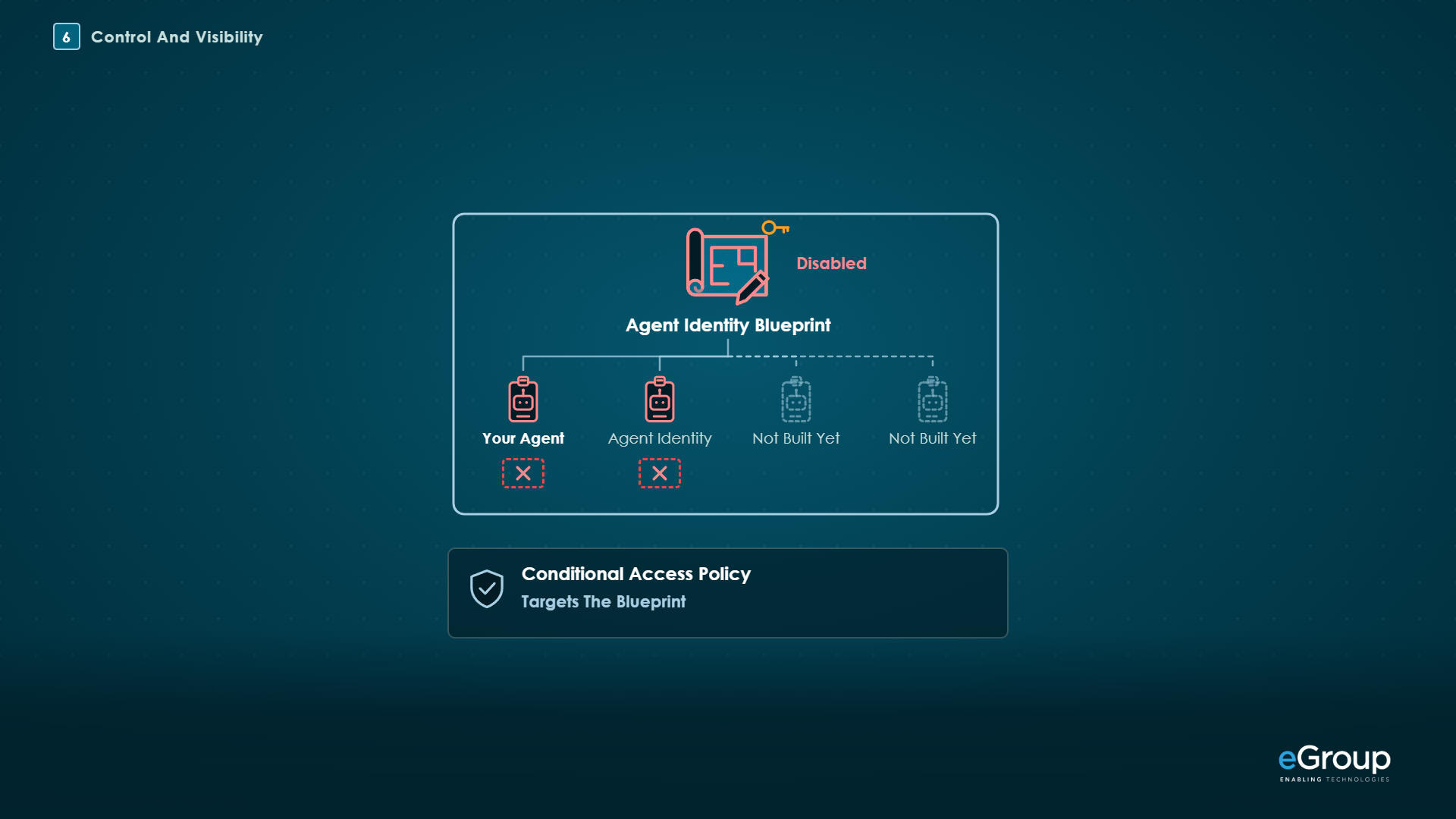
Conditional Access can block every agent except the ones you've approved. You include all agent identities and exclude chosen blueprints or agent identities, or use custom security attributes, which Microsoft calls the recommended approach. Block is the only grant control for agent identities, since nobody is there to complete an interactive prompt. A policy that targets a blueprint covers every agent made from it, including the ones you haven't built yet. I would start these policies in report-only mode, so you see what they would block first, and the results show on the Report-only tab of the sign-in logs.
Disable the blueprint, and none of its agents can sign in and no new ones can be created from it. Disable one agent identity, and you stop just that agent. Re-enabling restores access and token issuance (Microsoft Learn).
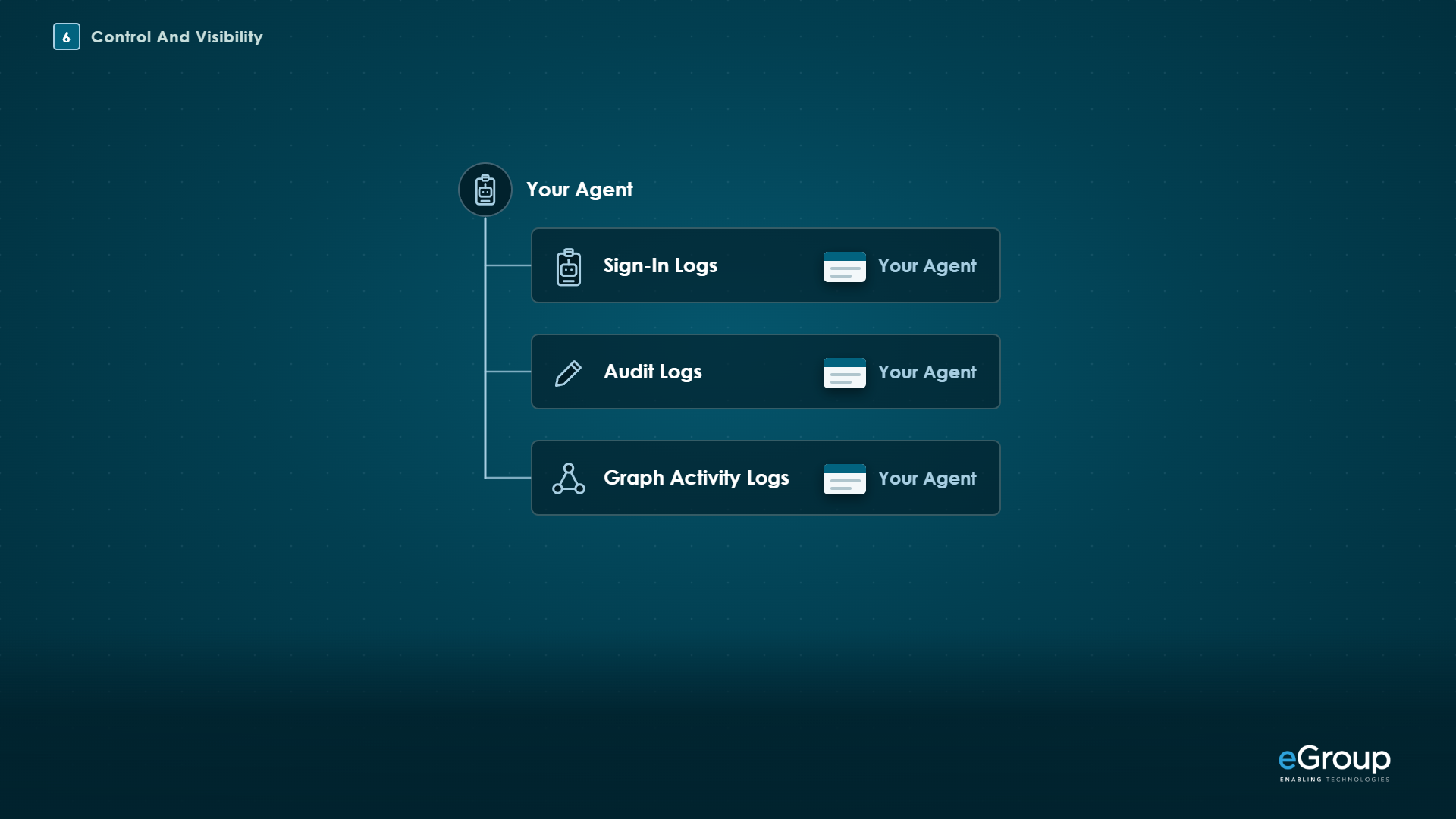
Every call leaves a trail with the agent's name on it:
-
Sign-in logs: filter by Agent type and Is Agent (Microsoft Learn).
-
Audit logs: records carry an
agentTypeproperty and ablueprintId. -
Graph activity logs: the agent identity is in the
AppIdcolumn, and you joinSignInActivityIdtoUniqueTokenIdentifierin the sign-in logs to tell what kind of identity made the call. They need Microsoft Entra ID P1 or P2 and a diagnostic setting, and delivery can take up to about two hours (Microsoft Learn). -
Microsoft Defender advanced hunting: agent activity is recorded in
CloudAppEventswith ActionTypes such asInvokeAgent,ExecuteToolBySDK,ExecuteToolByGateway, andExecuteToolByMCPServer(Microsoft Learn). Defender's AI agent detections are in preview as of October 2026. -
Telemetry from the agent itself: the Microsoft OpenTelemetry Distro, which replaces the deprecated Agent 365 Observability SDK.
Microsoft's Conditional Access and Graph pages list the licenses these controls need:
| Control | License, as of October 2026 |
|---|---|
| Conditional Access for agents | Microsoft 365 E7, or a Microsoft Agent 365 license with at least Microsoft Entra ID P1 |
| Agent risk-based policies (preview) | Microsoft Agent 365 with Microsoft Entra ID P2 or Microsoft 365 E5 |
| Graph activity logs | Microsoft Entra ID P1 or P2, plus a diagnostic setting |
Agent 365 is licensed per user, and as an add-on it needs Microsoft 365 E5, A5, or Business Premium, or the Microsoft Defender Suite and Microsoft Purview Suite, underneath it (Product Terms).
The benefit is extending your security and compliance to the agents you build, using the same methods and platforms you already use for your users.
What should you check before you build?
Microsoft's documentation doesn't yet settle a few things that affect how you build, as of October 2026, and I'd test each one before relying on it:
-
How quickly disabling a blueprint or an agent identity takes effect, and whether tokens already issued keep working until they expire.
-
How the sidecar's cache handles long-running work for a user. The cache is in memory, each replica has its own, and nothing is persisted, so check whether it holds an on-behalf-of refresh token and what happens to background work after a restart or scale-out. Microsoft's guidance for long-running on-behalf-of work has the app store the user's token itself.
-
The sidecar's
AllowOverridessetting, added in version 1.1.0, which controls per route whether the agent can pass theAgentIdentityparameter. Microsoft Learn doesn't document it yet. -
Whether your MCP server's app registration has to opt in to
xms_par_app_azpand the other agent claims as optional claims. -
Whether an agent you build can call a bring-your-own MCP server through the Agent 365 Tooling Gateway. It isn't documented for custom agents, so the API Management pattern above is the documented path.
My take
I think Entra Agent ID solves what has made custom agents hard to approve: they had no identity of their own for security to govern. Each agent now has a name you can find in the logs, permissions the security team decides on, and an off switch for one agent or a whole kind of agent.
If I were building an agent outside Copilot Studio or Foundry, I'd give it an agent identity from a blueprint backed by a managed identity, let the sidecar handle every token, and put API Management in front of any vendor's MCP server instead of handing the agent a key. Then I'd turn on a block-all-except-approved Conditional Access policy in report-only mode and see what it would catch before enforcing it.
Where this doesn't apply is agents built in Copilot Studio or Microsoft Foundry, which get their identities through those platforms, so most of what's here is handled for you. And if an agent needs per-user access to a vendor's service, that isn't documented for agents yet, so I'd treat it as its own design question.
Working through the same problems?
Jason compares notes with IT leaders every week. Reach out on LinkedIn.