BlogAzure
Azure Day 2026 - Recap: The Real Value of Cloud Modernization Is What You Leave Behind
Day One of our virtual roadshow, Session Two. Dustin Meany took the stage to talk about modernizing applications on Azure. (Second in a five-post series unpacking what we covered.) Dustin opens it with the moving-houses analogy. I will start there too.
The premise is simple. When most people move, they realize how much stuff they’ve accumulated. Stuff that might no longer hold value. Meaning, it’s not even worth carrying that. The new place gets the attention, and the value is in the fresh, clean, start. A chance to do things they way you want to from the lessons you’ve learned.
His point: The real value of cloud modernization is what you don’t bring with you. The cost savings in nearly every Azure case study I see come more from the things that stopped running than from the things that migrated in the cloud.
Technical debt is mostly a structural problem
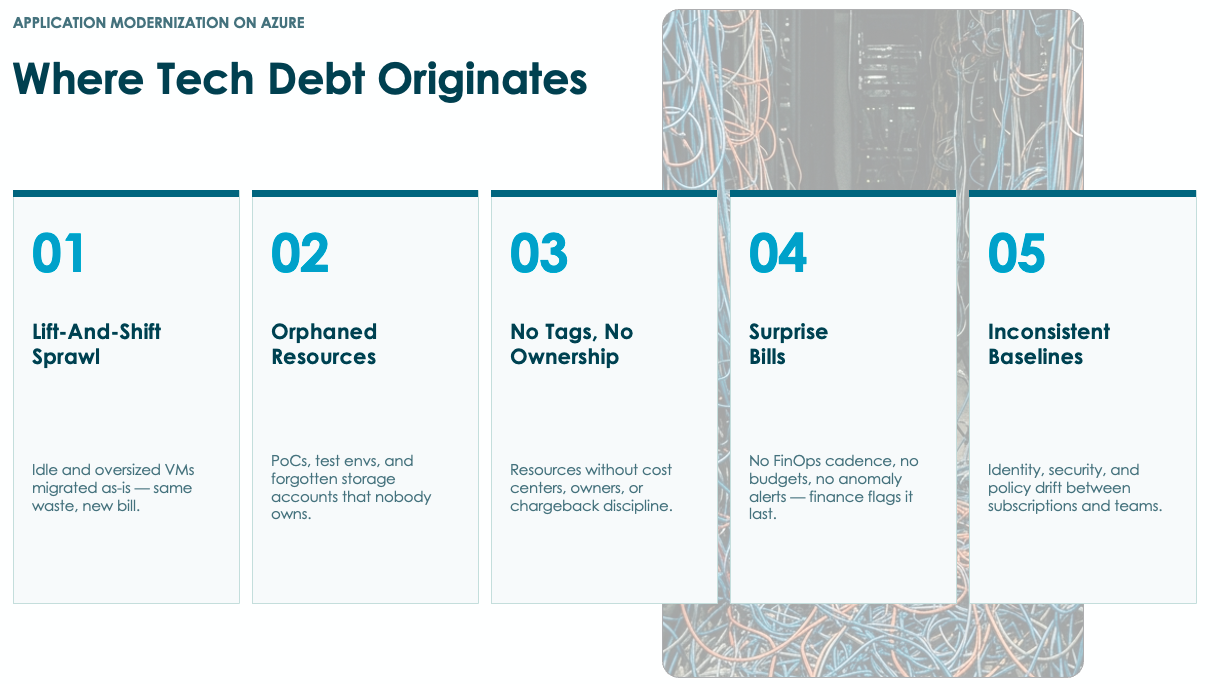
One of the more useful framings from Dustin's session was on where technical debt actually comes from. The popular answer we heard in the session (lazy code, shortcut decisions, band-aids) is mostly wrong.
Real technical debt accumulates from decisions that engineers do not control. Requirements shift mid-project. A launch date will not move. Leadership turnover changes the strategy halfway through. An acquisition bolts another team's debt onto yours overnight. A reorg leaves systems without an owner. Every one of those forces a tactical decision in an effort to get it done, and the tactical decisions accumulate.
If you only fix the symptoms (move the same applications, the same way, into a new environment), the pattern repeats. The Azure environment ends up with the same untagged resources, the same subscription sprawl, the same teams spinning up services with no policy enforcement. Get the operating model right and the Rs framework Jason walked through in Post 1 becomes a real decision tool. Skip it and you are about to rewrite this exact paragraph in 18 months.
Modernization patterns that actually move the needle
Dustin walked through specific patterns we use with clients. Here were the examples, albeit limited based on the large pool to choose from.
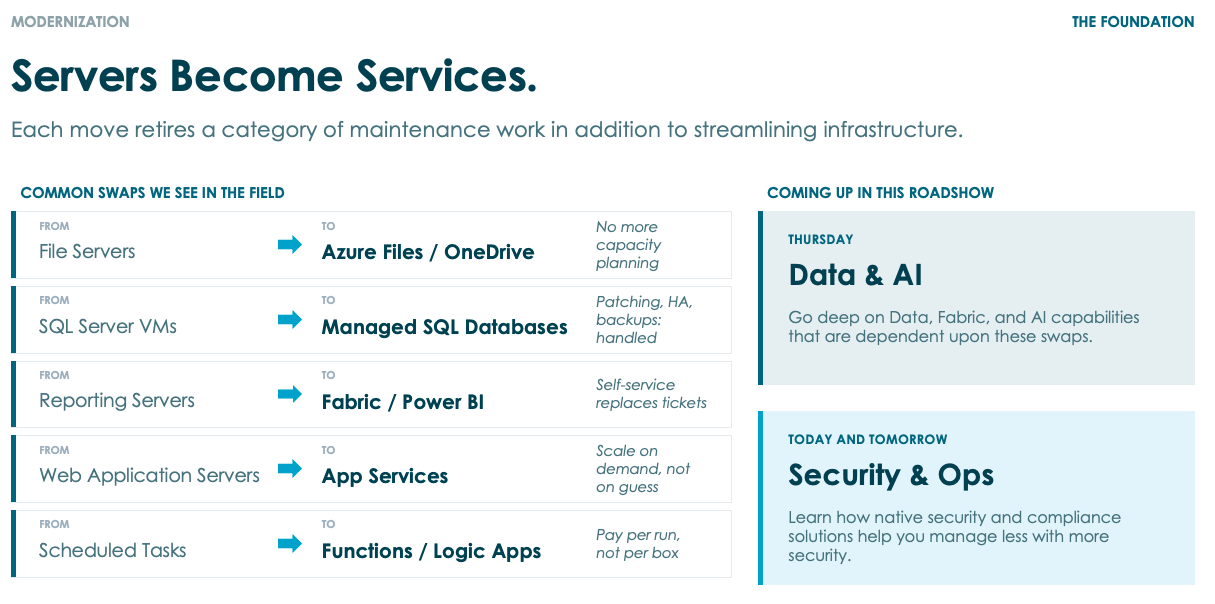
File servers to Microsoft 365 plus Azure Files. Active collaborative content (Word, Excel, the share-with-link world) belongs in SharePoint, OneDrive, and Teams. Archive content, profile shares, and application data in Azure Files or storage account blobs. The file server VM goes away, and the patching windows, the VPN-dependent access, and the backup complexity go with it.
SQL Server VMs to Azure SQL. Two flavors matter. Managed Instance is for workloads with linked servers, SQL Agent jobs, cross-database queries, anything that needs SQL Server feature compatibility. Azure SQL Database is for the lighter, more elastic workloads. Both come with patching, backups, high availability, and disaster recovery baked in, so your database administrators stop doing care-and-feeding work and start working on schema design, performance tuning, and architecture. Database Migration Service handles the cutover with near-zero downtime.
SQL Server Reporting Services to Microsoft Fabric. This one is underrated because it solves two problems at once. Operationally, the reporting servers were IaaS workloads with their own patch cycle, license, and backup story. Fabric retires that. Analytically, your existing paginated reports keep working while the semantic models open up to Power BI self-service, Lakehouse analytics, and Copilot for Power BI for natural-language interaction with the data. I added a useful aside during the session: AI is also a real capability for building the Power BI files themselves. Have an agent generate the PBIX with the queries and dashboard configuration you describe, and you skip the click-by-click style work that gives most reports their awkward look.
Web apps to Azure App Services. The classic web tier sitting on a VM nobody remembers configuring, getting patched on whatever cycle that team enforces. App Services takes the runtime out of your operational picture. Auto-scale. App Service Environment if your compliance posture needs isolated single-tenant deployment. The App Service Migration Assistant tells you what will need attention before you start (usually authentication or storage location). Most ASP.NET and Java workloads move with minimal application changes.
Active Directory to Entra ID. Save this one for last, after the dependencies have been migrated off. The day you decommission the last domain controller is satisfying for a reason most people understate. You stop carrying Kerberos configuration, ADFS, group policy troubleshooting, the certificate services, DHCP, RADIUS. The authentication protocols modernize. The attack surface shrinks. Conditional access covers everything because everything authenticates through Entra. Modernizing authentication should be a priority for most organizations.
The Retire bucket is the most underused
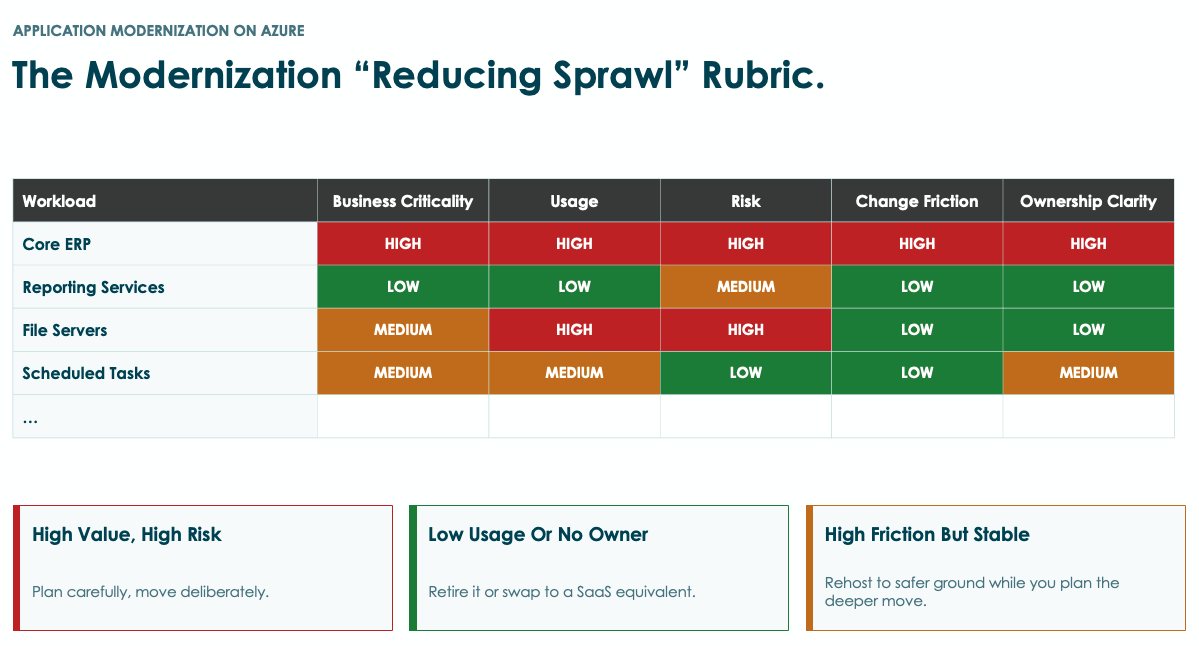
Dustin and I both kept coming back to this. The R most teams skip is the simplest one. In nearly every Azure assessment, a good percentage of the workload inventory should be retired before anything moves. Applications replaced by SaaS that nobody decommissioned. Reporting jobs whose business value died years ago. Utility VMs running cron jobs nobody actually uses.
The most useful thing you can do in a modernization workshop is put application owners in the room and let them score their own workloads against the rubric: business value, customer impact, platform fit, rework effort, blast radius. Owners surface information IT does not have. Owners also volunteer their own applications into the Retire bucket faster than IT would on their behalf.
The total-cost-of-ownership case study Dustin shared, anonymized from a real client, went from $3.1M on-prem to $1.9M in Azure. The savings split came from right-sizing during migration (Azure Migrate did the work), about 9 percent in retirements, and reserved instances plus savings plans on the steady-state workloads. Storage tiering optimized further.
Why this is the AI strategy conversation
Dustin closed his session with the point most teams will under-appreciate. Every "our AI isn't working" story I see traces back to the same four prerequisites. AI needs to reach the underlying data. The identity model needs to give agents context for who they are acting on behalf of. Applications need callable APIs. The semantic layer needs reporting infrastructure modern enough to host it.
Each of those is a modernization step. Move SQL to Azure SQL and Copilot for SQL lights up. Move reporting to Fabric and Copilot for Power BI works against trusted semantic models. Refactor your application APIs and custom agents in Copilot Studio or Azure AI Foundry can act on user context.
If your strategic plan has anything new on it for AI this year (data, automation, customer service, agent-driven workflows), modernization is the precondition.
Where this leaves you
The shortest path to AI value is disguised as work: which workloads can be retired this quarter, which file servers can move to Microsoft 365 and Azure Files, which SQL Server VMs are ready for Azure SQL, which reporting can land in Fabric.
If you want to walk through your workload inventory, model which patterns apply where, and figure out which retirements and migrations should be on your next two quarters, reach out.
Working through the same problems?
Jason compares notes with IT leaders every week. Reach out on LinkedIn.