BlogSecurity
Azure Day 2026 - Recap: A Practical Tour of Defender for Cloud (and Where to Start)
Day One of the roadshow, Session Four. Phil Kinsley joined me to walk through the modern threat landscape and Defender for Cloud specifically. (Fourth in a five-post series unpacking what we covered.)
The same pattern keeps coming up in client conversations: most organizations own more Defender capability than they have actually turned on. The gap between "what is in your tenant" and "what is actively defending you" is usually wide enough to be a very expensive opportunity your security program is overlooking.
The threat shift
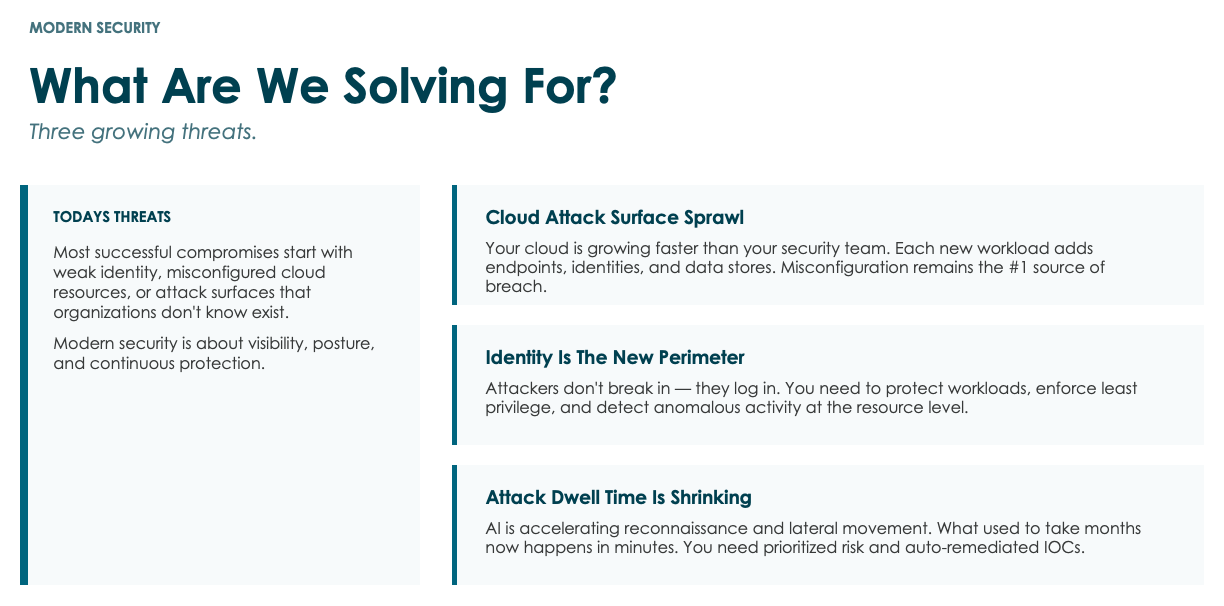
Attack dwell time has compressed in a way most operational practices have not caught up with. A few years ago, ransomware sat in environments for an average of ten months before activation. Today, by industry-reported data, it can be ten seconds. Phil's point during the session is that identity has always been the most exposable surface, because the human is in the process. What has changed is the speed at which attackers move once they find an opening.
A traditional yes-or-no access check (password plus MFA, gain entry) is no longer sufficient. The decision has to come from intelligence, behavioral analytics, and signal correlation. Conditional access has to weigh behavior and risk signals at the moment of access, beyond the initial password-plus-MFA check.
What Defender for Cloud actually is
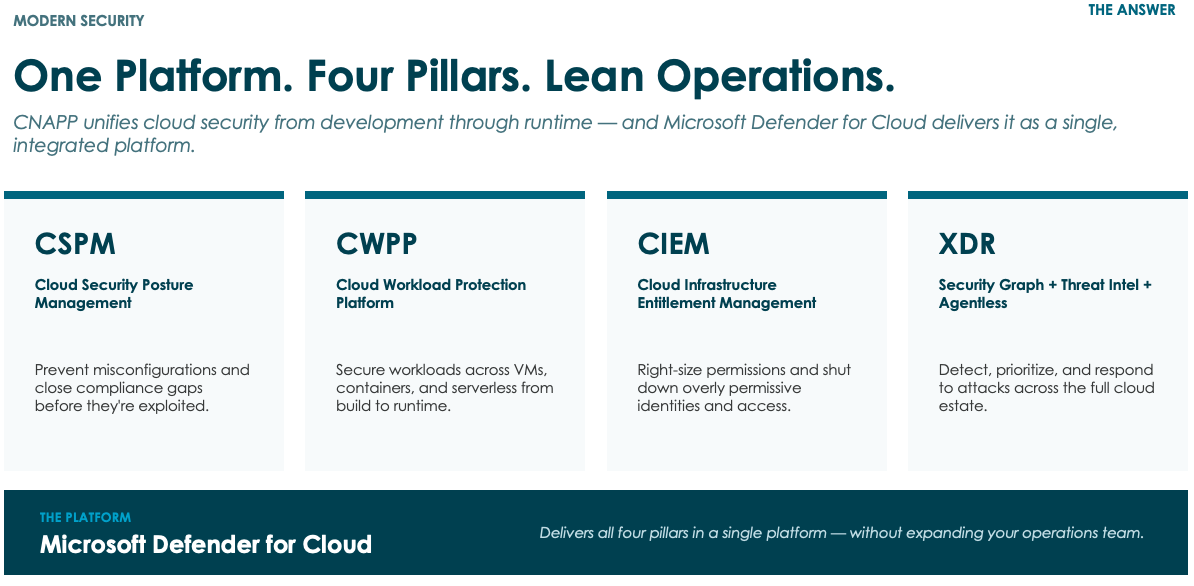
For anyone who has heard "Defender for Cloud" used loosely, here is Phil's clean version. Defender for Cloud is one platform that does four things across your entire estate, including Azure, AWS, GCP, and on-premises connected through the Arc agent.
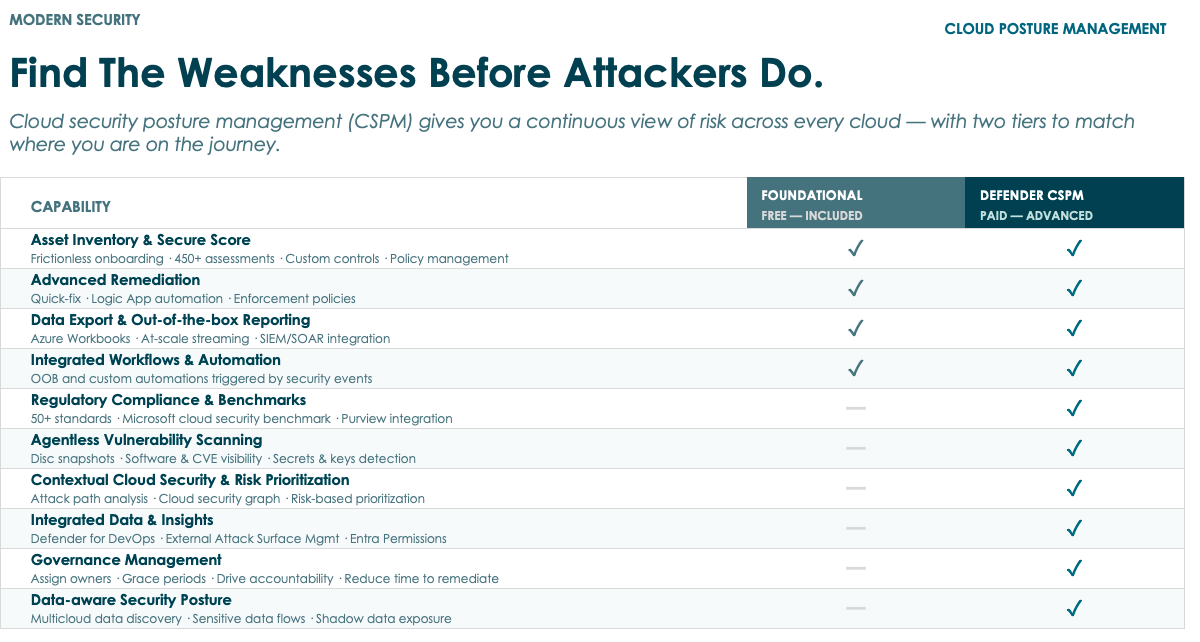
Cloud Security Posture Management (CSPM). Continuous scanning of your environment against 30-plus regulatory and best-practice baselines (NIST, HIPAA, PCI DSS, CIS, and more). Foundational CSPM is free. Asset inventory, secure score within 24 hours of turning it on, remediation guidance, SIEM integration. There is essentially no reason a Microsoft customer should not have this on.
Cloud Workload Protection. Active defense for the things running inside your tenant. SQL databases, file integrity monitoring, container security, key vaults, storage, the Defender-for-X family.
Cloud Infrastructure Entitlement Management. Permission right-sizing. Catches over-permissive access assignments before they become the attack path.
Extended Detection and Response. The unified dashboard that ties together Defender for Endpoint, Defender for Identity, Defender for Office 365, External Attack Surface Management, and the rest of the Defender family. Heads-up: the Defender for Cloud console is migrating from portal.azure.com to security.microsoft.com as part of the unified operations center work. Same data, fewer portals.
Phil credited Dustin with the phrase "Defender for Everything" during the session. The product surface is now wide enough to cover compute, services, databases, storage, and AI workloads (Foundry, OpenAI models) under one roof.
Start with CSPM, paid tier second
The most common mistake we see is teams trying to evaluate Defender for Cloud as an all-or-nothing decision. The much better path is staged.
Step one: turn on foundational CSPM. Free. Twenty-four hours later, you have a secure score, a prioritized remediation list, and a compliance posture across whatever baselines matter to your industry. We do this as a goodwill kickoff for our CSP customers, and the conversation we have afterward is almost always "I had no idea that was exposed."
Step two: enable Defender CSPM (the paid tier). Roughly ten to fifteen dollars per asset per month, depending on your licensing. The reason to pay for this is one specific feature: contextual cloud security risk prioritization. Foundational CSPM tells you what is wrong. Paid CSPM connects the issues into actual attack paths. Phil's worked example during the session: a server with overly permissive access controls, web-facing, running an unpatched CVE on IIS, with a graph API call back to a Key Vault. Individually each is a finding. Together, they are an attack path that exposes your secrets to the internet, and prioritized accordingly.
Step three: enable the specific Defender for X services by policy, on the resources where they earn their keep. Defender for Servers on every server, Defender for Storage on the storage accounts that hold sensitive or backup data, Defender for SQL on databases that hold customer or financial data, Defender for Containers on your production cluster. The mistake teams make is flipping everything on across the board and then complaining about the bill. The fix is to do this the same way Jason walked through landing zone policy in Part 1: define which container of resources gets which Defender by policy, and let the tenant inherit.
The Defender for X services Phil walked through
Phil walked through several:
Defender for Servers (P1 vs P2). P1 is heuristic pattern matching. P2 is intelligence-backed, with sample-to-cloud-and-back updates that push signature changes to your fleet in real time. For anything past a small environment, P2 is the right answer.
Defender for Storage. Phil's recommendation for the first one to turn on. One-click enable on a storage account, real-time malware scanning, quarantine on detection, alerts on unusual access patterns and public exposure. One caveat: the Azure pricing calculator initial estimate is intimidating and usually overstates what you will actually pay. Get a real number from someone who has modeled this before you let the estimate scare you off.
Defender for Containers. Vulnerability management with risk-based prioritization (exploitable in the wild versus theoretical), continuous scanning, multi-cloud via Arc. If your CI/CD pipelines build and tear down containers, this needs to be policy-integrated into your build process from the first commit.
Defender for SQL (and Databases). Brute force, credential compromise, SQL injection, lateral movement from database memory into OS memory, data exfiltration. SQL injection should not be a thing developers have to defend against by hand anymore.
Defender for AI / Defender for AI Workloads. Most teams have not yet turned this on. As Foundry usage and custom Copilot deployments grow, the prompt-injection and model-misuse risk grows with them. Defender coverage for that surface area is now native.
The shift Phil is seeing right now
Phil's closing observation: the conversation he and I are having most often with clients right now is about data readiness for AI.
Copilot will discover everything a user has access to, which is usually more than anyone realized. Sensitivity labels that have sat unenforced for years suddenly matter. Permission models that worked fine when humans were doing the clicking start to break when an agent is acting on behalf of a user. About half of Phil's week is now spent on data-readiness and security calls. Defender stays the protection layer. Purview, sensitivity labeling, access governance, and the right environment design are what give Defender something defensible to protect.
Where this leaves you
Three concrete moves for the next month:
Turn on foundational CSPM in your tenant. Free. Give it twenty-four hours, then read the secure score and remediation list with someone who has worked these before. If you need help activating this, call us. We can walk you through it.
Model the paid Defender CSPM uplift against your asset count. The contextual attack-path prioritization is what changes how your security team spends its time. Worth modeling against your actual asset count before you decide.
Define which Defender for X services attach to which resource classes by policy. Bake the assignments into your landing zone so every new resource inherits the right protection without anyone having to remember to enable it.
If you want to walk through your current Defender posture, run a security review against your Azure estate, or scope the data-readiness work that has to come before any AI deployment lands in production, reach out.
Working through the same problems?
Jason compares notes with IT leaders every week. Reach out on LinkedIn.