BlogAI
AI Governance: How Shadow AI Puts Company Data at Risk
Video · 3:16
How Shadow AI Puts Company Data At Risk
Your people are already using AI at work. Some of it you approved, and some of it you've never seen. That second group is shadow AI: the AI tools and agents in use that the business hasn't approved and your security team can't see.
Left ungoverned, it's a risk to your company's data. Microsoft's 2026 Data Security Index, a survey of data security leaders, found that 32 percent of data security incidents involve the use of generative AI tools.
I built the slide in this post for a conversation with business leaders, because the risk is easier to talk about when you can point to the path the data takes. I think shadow AI gets to company data along a predictable path, and once you can see the path, you can put a control on each step.
Three ways in
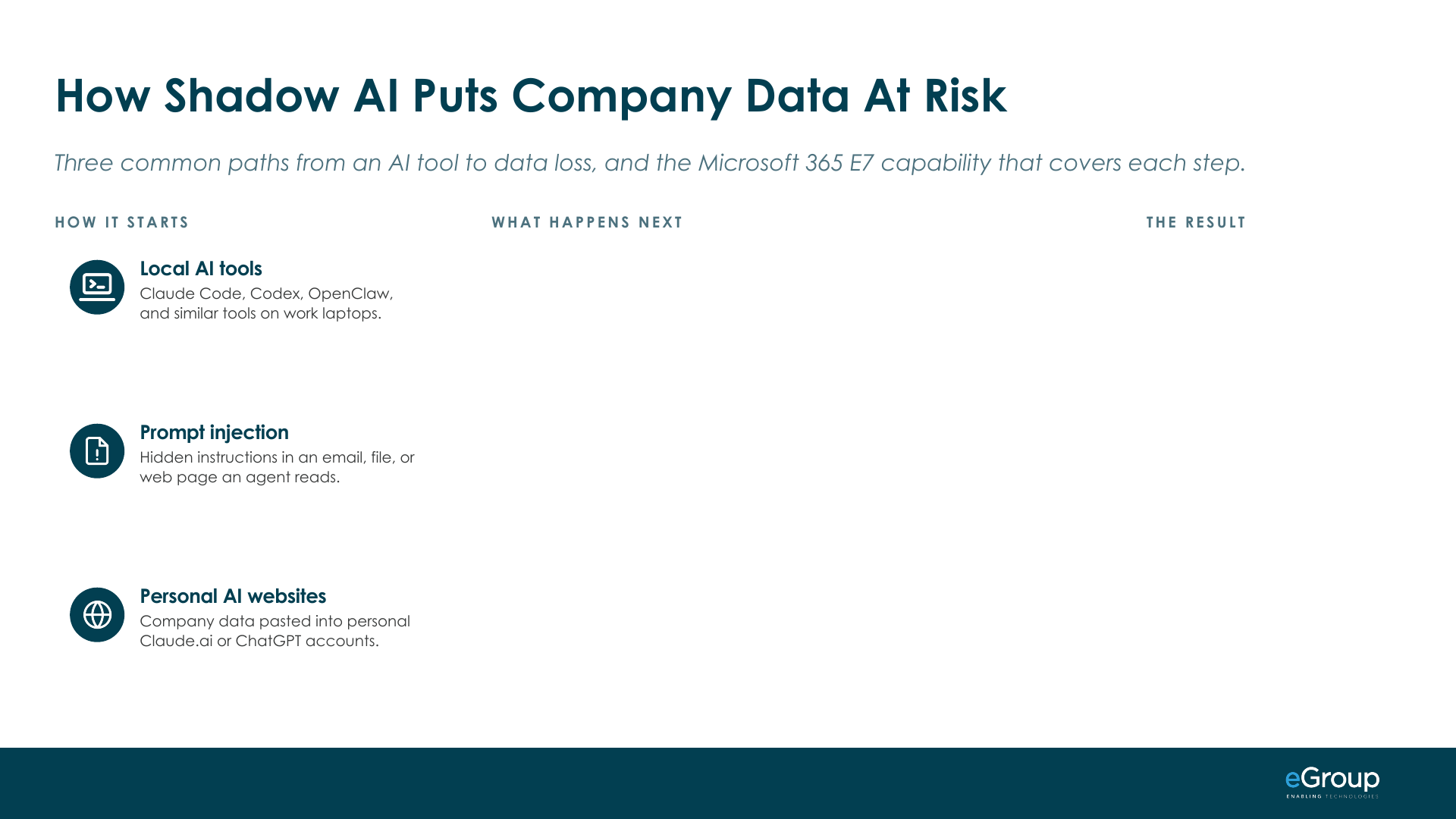
Local AI tools. These are coding agents and desktop AI apps installed on a work laptop, such as Claude Code, Codex, and OpenClaw. People install them because they're good at real work. A local AI agent runs on the device with the permissions of the person who installed it, so it can reach whatever that person can reach. Many of them also connect to other systems through MCP (Model Context Protocol) servers, which are small connectors that give an agent access to a tool or a data source.
Prompt injection. An agent reads an email, a file, or a web page that has hidden instructions in it, and follows them as if they came from the user. The person never sees the instruction. This can happen to an approved agent too, so approving a tool doesn't close this path by itself.
Personal AI websites. Someone pastes or uploads company data into a personal Claude.ai or ChatGPT account. There's no attacker in this one. It's usually a person with good intentions trying to get their work done faster.
What happens next
The first two paths meet in the same place. The tool, or the compromised agent, works with the employee's access: files (OneDrive), email, saved passwords, and keys. From there it reads sensitive data that was shared too broadly, like finance, HR, and customer records, or other sensitive data, because anything the employee can open, it can open. Then it takes actions no one approved (or can detect). It sends, changes, deletes, or runs commands.
The third path is shorter. The sensitive data goes straight into the prompt, and no attacker is needed.
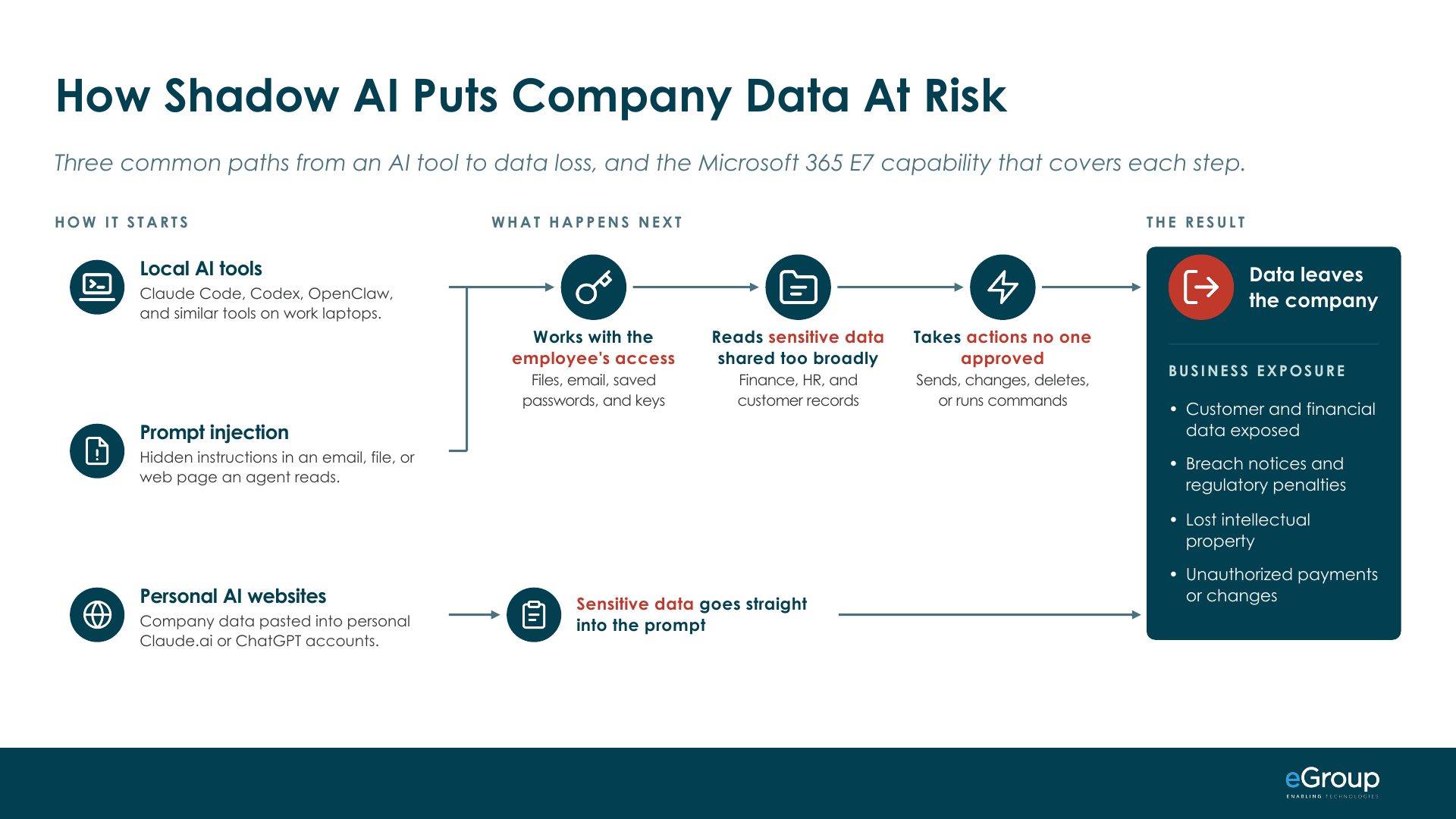
Every path ends the same way, with data leaving the company. For the business, that means exposed customer and financial data, breach notices and regulatory penalties, lost intellectual property, and unauthorized payments or changes. It works like the identity attack chain most IT leaders already know, where a stolen password leads to access and the access leads to data.
The controls on the three ways in
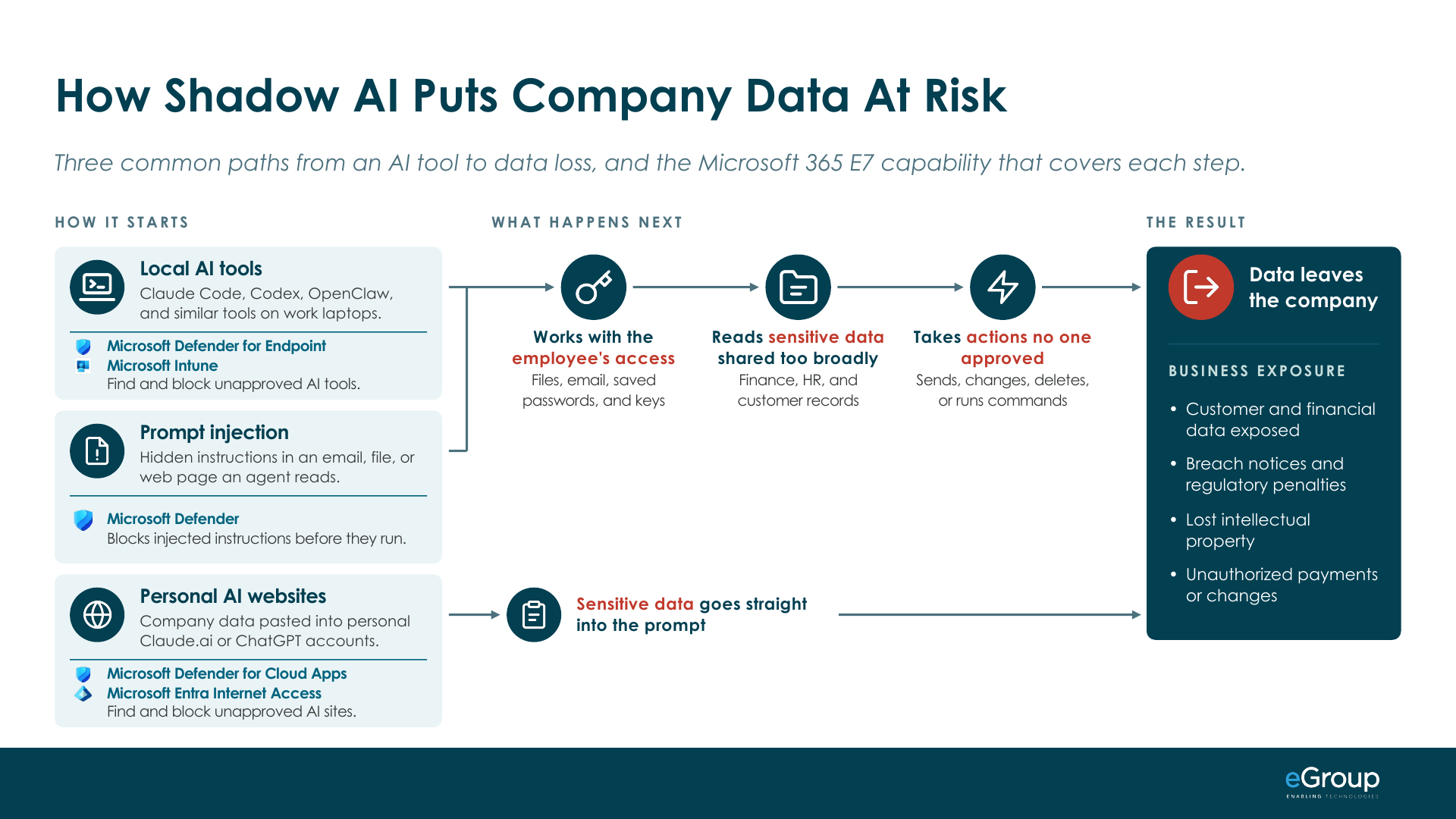
Start with the local tools. Microsoft Defender for Endpoint discovers local AI agents and their MCP server configurations on onboarded Windows and macOS devices, with macOS discovery in preview. Microsoft's documentation lists Claude Code, Codex CLI, GitHub Copilot CLI, Cursor, ChatGPT Desktop, Claude Desktop, Ollama Desktop, and OpenClaw among the tools it finds but in reality, there are many more getting added weekly. Intune then allows you to block installation of the AI apps you haven't approved on managed devices. If you are restricting where data can exist correctly, this builds a wall around your sensitive data. What you get is an inventory of which tools are on which devices and what each one is connected to, and that's what lets you approve the tools people depend on.
Prompt injection is handled while the agent runs. Microsoft Defender has runtime protection for AI agents that inspects the prompt, the tool request before it runs, and the tool response. The idea is that an injected instruction gets blocked before the agent acts on it. You can run it in audit mode first to see what it would catch, then switch to block. It's in preview and runs on Windows today, and it supports Claude Code, Codex CLI, GitHub Copilot CLI, and the GitHub Copilot app, plus OpenClaw through network inspection.
Personal AI websites have three controls. Defender for Cloud Apps lists the generative AI apps in use across your organization with a risk score for each, and marking an app as unsanctioned blocks it. One limit to know is that the block covers managed network connections, so an unmanaged device or a home network still gets through. Entra Internet Access, Microsoft's secure web gateway, restricts AI sites by user and group. Purview Data Loss Prevention then covers the data itself: Endpoint DLP warns or blocks when someone pastes or uploads sensitive data to an AI site in the browser, on onboarded Windows devices. That control follows the sensitive content, whichever AI site it's headed for.
The controls after an agent gets in
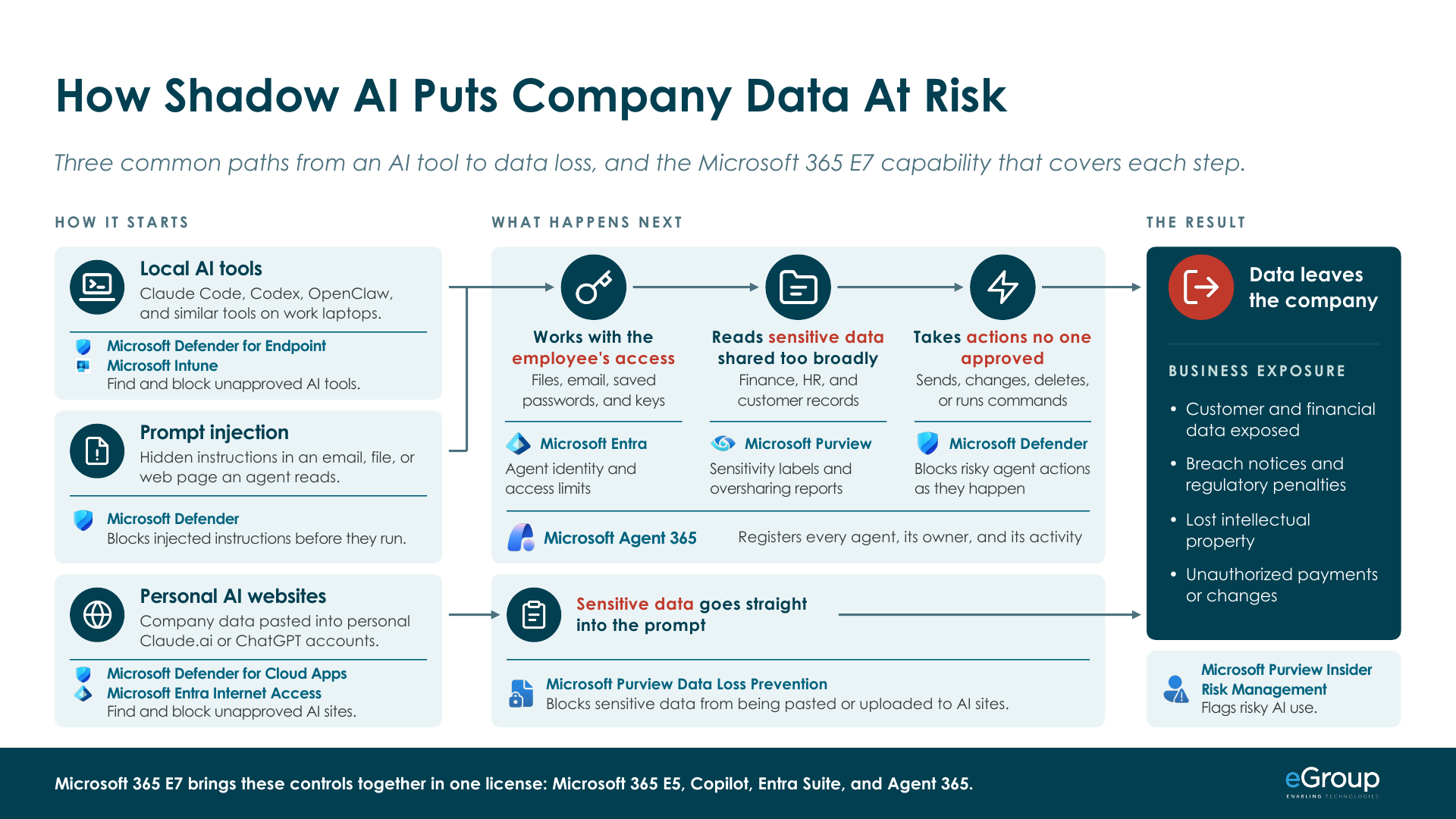
The three steps in the middle of the slide are covered by tools you already use for people, extended to agents by Microsoft Agent 365. Agent 365 is Microsoft's control plane for AI agents, generally available since May 1, 2026. It gives you a registry of every agent in your organization, including shadow agents, each with a sponsor (the person accountable for it) and a record of what it does. I've written about how Agent 365 works and about governing a custom agent built outside Microsoft.
The first step, working with the employee's access, is covered by Microsoft Entra. It gives each agent its own identity, called a Microsoft Entra Agent ID, and extends Conditional Access and identity protection from users to agents. You can limit what an agent reaches the same way you limit a user.
For sensitive data that was shared too broadly, agents honor Purview sensitivity labels, with two conditions Microsoft's documentation spells out: the file has to be shared with the agent, and the label's encryption has to grant the agent rights to view and extract the content. Content an agent creates doesn't inherit the label from its sources. Purview's Data Security Posture Management (DSPM) reports show where data is overshared, so you can fix the oversharing before an agent finds it.
Unapproved actions are where Microsoft Defender comes back in. It detects suspicious agent activity and blocks malicious tool calls as they happen. You detect a compromised agent the same way you detect a compromised user.
At the end of every path, Purview Insider Risk Management has a risky AI usage policy template, and its triggers for data leaving the company apply to agents as well as people.
Which license each control comes with
A fair amount of this comes with licenses many organizations already own. Here's where each control sits.
| Step | Control | Comes with |
|---|---|---|
| Local AI tools | Defender for Endpoint (finds them) | E5 |
| Local AI tools | Intune (blocks unapproved apps) | E3 |
| Prompt injection | Defender runtime protection for AI agents (preview) | E5 |
| Personal AI websites | Defender for Cloud Apps | E5 |
| Personal AI websites | Entra Internet Access | E7 |
| Data into the prompt | Purview Endpoint DLP | E5 |
| Works with the employee's access | Entra Agent ID and Conditional Access for agents | E7 |
| Reads sensitive data | Purview sensitivity labels and DSPM reports | E3 for manual labels, E5 for automatic labeling and DSPM |
| Takes unapproved actions | Defender threat protection for agents | E7 |
| Under the whole chain | Agent 365 | E7 |
| Data leaving | Purview Insider Risk Management | E5 |
Microsoft 365 E7 is Microsoft 365 E5 plus Copilot, Entra Suite (Microsoft's identity and network access bundle), and Agent 365 in one license. Entra Internet Access is part of Entra Suite, and the agent identity and agent threat controls come with Agent 365. One detail on discovery: finding local AI tools needs Defender for Endpoint Plan 2, which is in E5, and the risk levels and recommendations on top of it need E7, or Agent 365 with Plan 2.
If you've read my M365 Maturity Model, this maps to it directly. The E3 and E5 controls are Levels 2 and 3, and the E7 controls are Level 4, AI Governed.
My take
People use AI at work because it makes them better at their jobs, and I think that's a good thing. I wrote in March about running OpenClaw responsibly on my own machine (definitely not my work one). A local agent is powerful because it has real access to the machine, and that access is also the risk. The same is true inside a company. The immediate benefit, in my view, is posture: knowing what AI is in your environment, whether it runs in the cloud, on a laptop, or in a browser tab.
The idea is to let your people use AI, on governed data, in a secure environment.
The rest of this series
The next five posts each go deeper on one part of the path:
-
What Agent 365 is, how it works, and what's new, as the layer under the whole chain.
-
Posture management for cloud, local, and shadow AI: finding the AI already in your environment and deciding what's approved.
-
Entra and agent identity: giving each agent its own identity and access limits.
-
Purview and agent data access: labels, oversharing, and keeping sensitive data out of prompts.
-
Defender and agent threats: prompt injection, and blocking risky agent actions as they happen.
Working through the same problems?
Jason compares notes with IT leaders every week. Reach out on LinkedIn.